

FrameRef @FrameRef_App
Modern reference board for creatives. Images, videos + PDFs on an infinite canvas. frameref.app Joined October 2025-
Tweets52
-
Followers20
-
Following4
-
Likes35
The release video for FrameRef 1.1 is now live! It covers all the new features in the update, while also showing why FrameRef might just be the reference board for you. Give it a watch and let us know what you think! 📷 youtu.be/te4hZi3YVj0
Our first major update, FrameRef 1.1.0, is here! It introduces our first AI features, voice memos, mind map functionality, portals, a customizable toolbar, and several bug fixes. More info is available in our release notes right here: polygonflow.notion.site/frameref-1-1-0

Has it ever been this easy to download videos from social media platforms? With FrameRef, this feature is built in and ready to be used.
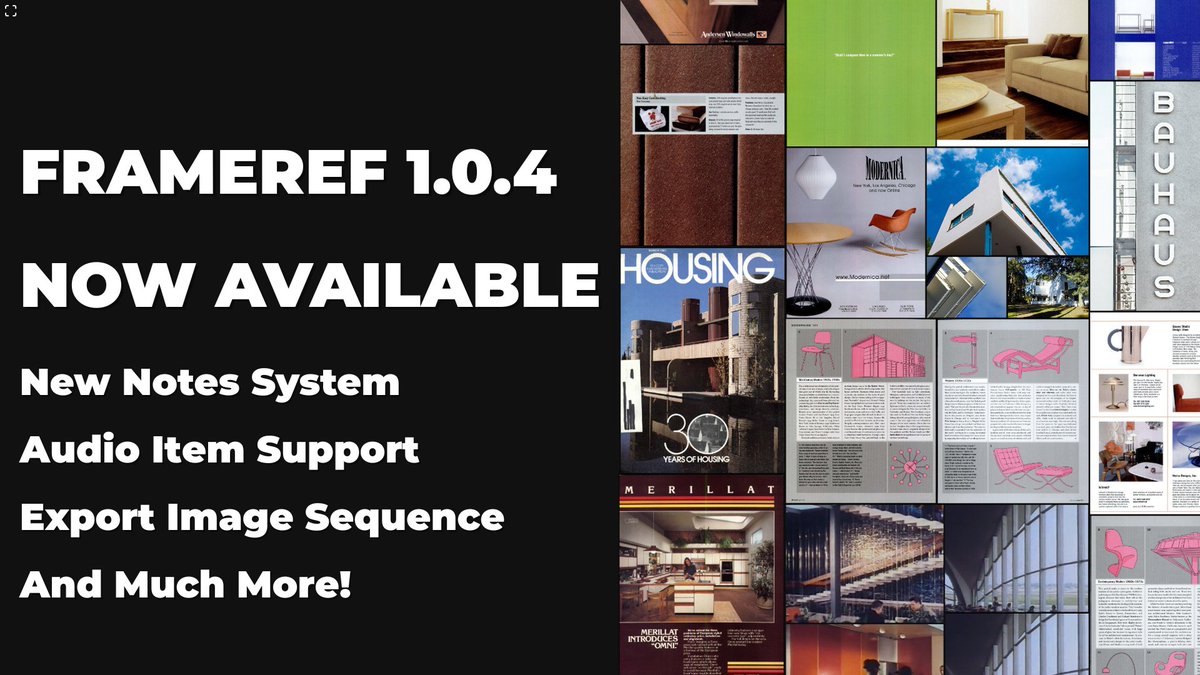
FrameRef 1.0.4 has just been pushed live! Highlights: New Notes System Audio Item Support Export Image Sequence And much more! Full release notes: polygonflow.notion.site/frameref-1-0-4
In order to make it easy to explore and learn the FrameRef reference software, we have put together a 4-part beginner series on YouTube. So feel free to check it out, and if you want an extended free trial period, comment below! youtube.com/playlist?list=…
In this fourth and final episode of the FrameRef basics series, we go over how you can use FrameRef with existing workflows.
The FrameRef reference board is more than just a place to collect references. It is also where you can collect, structure, and plan your thoughts and projects. In this third part of our basic series, we cover just this. Stay tuned for the fourth and final episode.
In Part 2 of this FrameRef basics series, we cover what reference types are supported, other than images. This includes videos, GIFs, PDFs, and more! Check it out and let us know if you have any questions or features you want us to add to FrameRef ☀️
If you are curious how the FrameRef reference board works, this new 4-part mini-series is for you. In our first part, we cover the basics, including import, the UI, and organization. Stay tuned for part 2, which will drop soon.
It's trivial, but very important --> Always-on-Top Mode Keep your reference board visible while working in other applications. Perfect for artists, designers, or animators who work across multiple programs.
With the FrameRef reference board, you can snap objects perfectly into place as you move them. You can also align edges instantly with quick tools for Left, Right, Center, Top, and Bottom.
As FrameRef supports Images, PDFs, Videos, and GIFs on the same reference board, we recently introduced a small but very convenient shortcut. Hold I on your keyboard, and you get to see your object types, perfect for quickly distinguishing your different references.
The ability to normalize by height and width was also introduced in FrameRef 1.0.3. This makes it easier to clean up messy reference boards by quickly matching selected items to the same height or width, while keeping their proportions intact.
Another feature in FrameRef 1.0.3 is our new Colour Swatches. With these, you can display a colour, its code, and its label. And to really make use of this new FrameRef item, we created an Extract Colour Palette action that spawns the most prominent colours for your selection.
@millenial9491 Indeed indeed! Similar thinking as us ✅✅
In FrameRef 1.0.3, we have added the ability to add categories to the homepage, so you can now organize your different boards efficiently.
@millenial9491 Glad to hear you like our updates! It's on the request list yeah, but we don't got a timeline for it no 😁 How would you see it? Like have all the features? Or just basic features to check the boards at a glance and add objects without transforming them?
One of our favorite new updates in FrameRef 1.0.3 is the new context menus. So now, depending on your selection, when you right-click, you will see a list, only containing useful actions for your specific selection.
FrameRef 1.0.3 is now available! 🎉 This update introduces new context menus, homepage organization improvements, color swatches & palette tools, graphics/display tablet support & much more! Full release notes and update guide: polygonflow.notion.site/frameref-1-0-3



pn @pnardik
77 Followers 1K Following
npr @npr2021
264 Followers 583 Following

Wizix @WiZiX_
2K Followers 417 Following Independent French CG Artist, 15+ years of passion for CG. I always try to push my skill forward to best transcribe the concepts I like.

XanderDK @XanderDK22
26 Followers 164 Following Crafting Dreams into Interactive Realities. Game Dev, 3D Modeler,
Yunus Creative @Yundexct
439 Followers 411 Following Helping authors, creators & knowledge brands turn ideas into influence, impact & income through creative strategy, content, book promotion, crowdfunding & growt

陸 三四 @312401441
225 Followers 7K Following Amateur Character maker. I am currently teaching myself ZBrush Blender and Substance Painter. I share screenshots of the game on Twitter.
Brymstudio @brymstudio
211 Followers 625 Following Motion Designer for brands | I create Product ads & explainers for AI, SaaS & modern digital products. 📩 DM for business promos
Daniel Fredén @daniel_freden
17 Followers 146 Following
Delible Think @deliblethink
20 Followers 654 Following
Миллениалы�... @millenial9491
0 Followers 53 Following
スノム @value3p
19 Followers 2K Following
Isa @isa___y
0 Followers 8 Following
Feliks Feofilou ⚓ @FFeofilou
38 Followers 493 Following
Sören Larsson @raylab_sv
104 Followers 2K Following
Ilgar @IlgarLunin
22 Followers 38 Following Research And Development Engineer, Programmer, CG generalist🤓
Polygonflow Dash @polygonflow
5K Followers 77 Following WORLD BUILDING SIMPLIFIED Unreal Engine Tools Without Complexity Try Dash for free: https://t.co/jZvef96BDA
Brymstudio @brymstudio
211 Followers 625 Following Motion Designer for brands | I create Product ads & explainers for AI, SaaS & modern digital products. 📩 DM for business promos
CG Channel @theCGchannel
56K Followers 185 Following Daily news and inspiration for anyone interested in CG, game art or visual effects. Part of the Gnomon group of companies: @Gnomon_School | @Gnomon_Workshop
Polygonflow Dash @polygonflow
5K Followers 77 Following WORLD BUILDING SIMPLIFIED Unreal Engine Tools Without Complexity Try Dash for free: https://t.co/jZvef96BDA
WallPapers 🔥 @Papers_app
1.2M Followers 251 Following Discover a curated collection of stunning wallpapers and exclusive Wallpapers with Papers WallpapersTrends for United States
You might like


















