React Navigation @reactnavigation
Routing and navigation for React Native and Web apps. Maintained by @satya164 reactnavigation.org Joined February 2018-
Tweets591
-
Followers11K
-
Following9
-
Likes528
We're adding an AI Usage Policy to the React Navigation repo. AI helps us move fast, but we believe humans should still have understanding of systems they are working on. It also must not replace human interaction. Open Source is about collaboration. Let's keep it that way. github.com/react-navigati…
The new Stack in Screens 5 is getting closer and closer 😍

React Native Screens 5.0.0-alpha.3 released! Stack v5 gains more header customization on Android and iOS; FormSheet v5 adds stacking; iOS supports SPM. swmansion.com/changelog/reac…
React Native Screens 4.28.0 released! Android fixes: tab bar layout after configuration changes, stable tab item ids, and a use-after-free crash. swmansion.com/changelog/reac…
Copilot knows what's up.


Here's how I'd start a React Native app today if I want it to be native: USE THE PLATFORM, don't reinvent the wheel. My must-haves: - react-native-screens from @swmansion, together with @reactnavigation. Native stack, native tabs, formSheet for bottom sheets, native modals, SF Symbols, Material Symbols, etc. Keep an eye on v5. - expo-ui from @expo for SwiftUI and Jetpack Compose components in JSX. Missing one? Have AI write it and contribute it back. - Nitro Modules from @margelo_io for low-level, fast native code (Swift, Kotlin, C++). Some good examples: react-native-mmkv for key-value storage (a must), react-native-healthkit, react-native-nitro-fetch. - expo-sqlite + drizzle-orm from @DrizzleORM if you need a local database. - Legend State from @jmeistrich. Write proper selectors, watch your re-renders, and close subscriptions on unfocused screens (think Android onResume/onPause). Be methodical. This is not the web, and React Compiler won't do it for you. - Do not block your app startup with anything. You should not need a splash screen if you don't want one. Use whatever tools you want. But React Native does not mean your app isn't native under the hood. Your iOS and Android builds end up very, very different, on purpose. You're just using abstractions that smart people built and keep curating for you. Do this and when something like the iPhone Duo comes out, your app just works on it. You were already using native navigation, sheets and components, so the platform adapts them for you.

react-native-screen-choreography 0.5.0 is out 🚀 Smoother shared transitions, zero rerenders during animations, and 60 FPS on Android and iOS. Works with Expo Router and React Navigation. Free and open-source.
While others imagine what life will be like after iPhone Duo drops (there won’t be any way to test it until Xcode 27.1), we’re focusing on what’s here and now. There are lots of cool improvements Apple is bringing with iOS 27: 👉 header minimization and restoration behavior 👉 prominent tab (no need for workarounds with search) 👉 header item visibility priority 👉 placing tabs in the sidebar (larger iPhones only), and more We’ll support all of it in upcoming versions of react-native-screens. Oh, and iPhone Duo will be supported as well 🫡

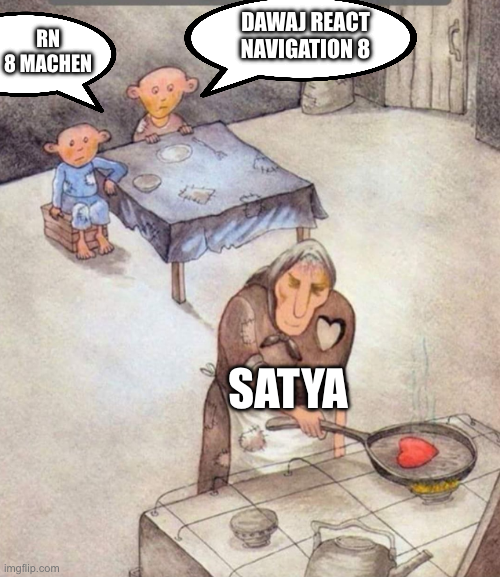
When you get a bit impatient waiting for React Navigation 8 @satya164

I researched React Native navigation libraries performance 3 months ago and thought I was going to make this into a book, but whatever, here it is: andrei-calazans.com/posts/2026-06-…
Spotted in the wild: React Navigation + GTK on Linux 👀 Happy to see the platform-agnostic core of React Navigation finally get some usage 😊 gtkx.dev/blog/gtkx-1-4

React Navigation 8 has one of the richest grammars* for URL patterns. This means you get more flexibility for your app's URLs, for deep links, and for browsers. Plus custom parse functions and standard schema for params mean they are type-safe in static config. *Not all features map cleanly.


Would not have been possible without independent navigation containers from react navigation... so THANK YOU react navigation
React Navigation 8 will support matching multiple path segments for links. Check out the docs: reactnavigation.org/docs/8.x/confi…

React Navigation is so good they also want it in Flutter.

@aleqsio @olu_tayormi it says react-navigation in his screenshot 😭 first time i see that in flutter
If the screen component itself is lazy loaded, you can do it in `screenLayout`. The core idea is to render a placeholder instead of screen content, and keep the same placeholder rendered until your screen's data is ready. For something that works with suspense, something like this should work - use a never ending promise to keep showing suspense fallback and switch to screen content on focus, which might also suspend keeping the fallback visible. And you'd placeholder content in suspense fallback. Though I'm not sure about the best way to provide a built-in option that'd work similarly yet.
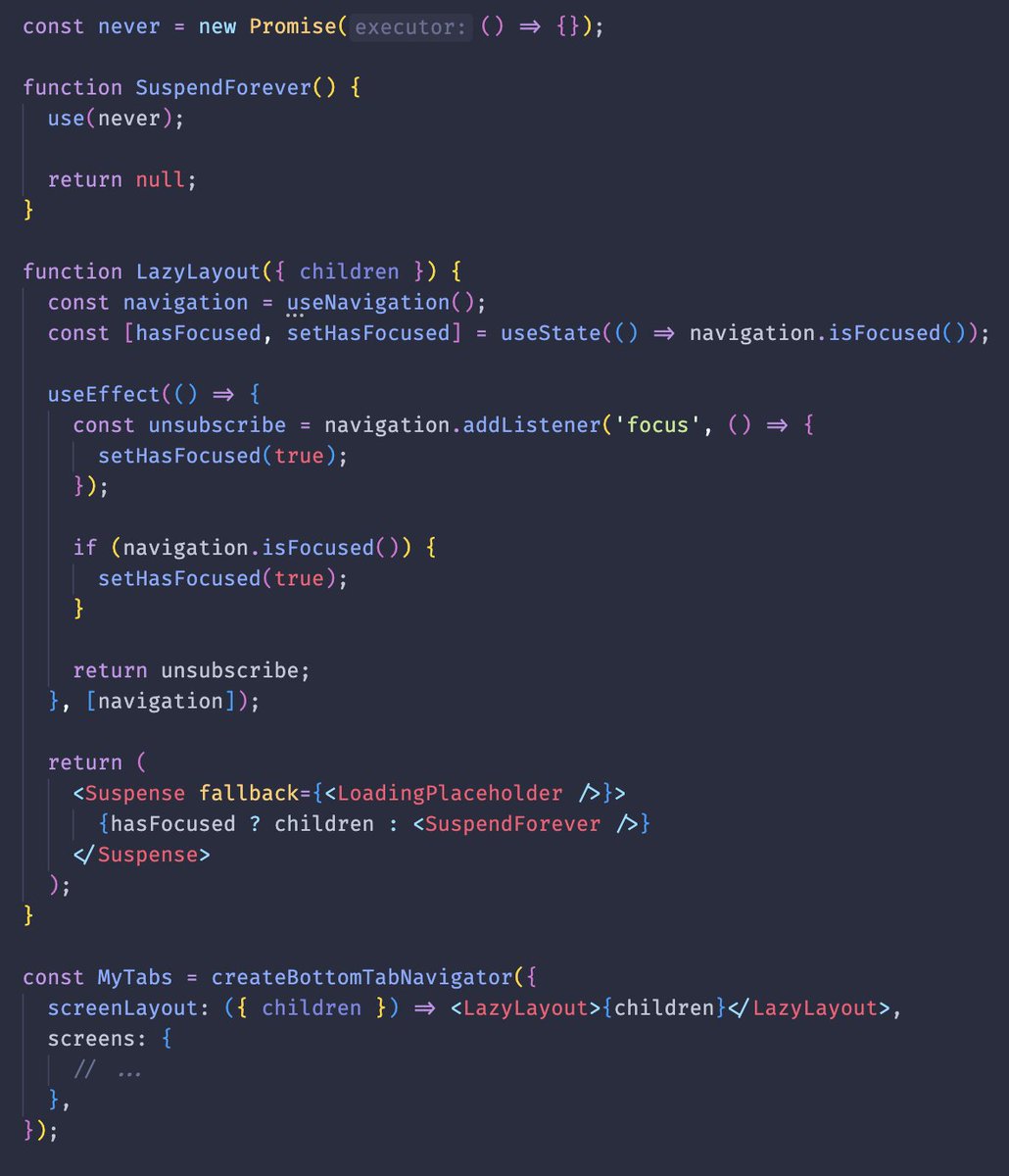
Unfortunately, enabling `lazy` results in a flicker when you tap a tab for the first time. The native component switches to the selected tab before React receives the event. So you can see a blank screen for a split second before the tab navigator re-renders with the screen content. So it's not possible to provide a proper solution in React Navigation at this time. An alternative is to render a placeholder component on the screen and keep it until data is loaded, then render the actual screen content. I discussed it with @kafara_kacper, and we need to experiment if there is a viable approach to avoid the flicker. We'll also explore how we can provide a built-in option for a placeholder component in React Navigation that works as I described.

iOS 27 scrolls content to the top when you tap the navigation bar. If you have a Pressable in the header, that's probably not what you want. react-native-screens now has an experimental <ScrollToTopGuard>. Wrap your custom view in it and the tap won't scroll to the top.
Congrats to my friend @stachbial for merging his first PR in @reactnavigation repo 🎉
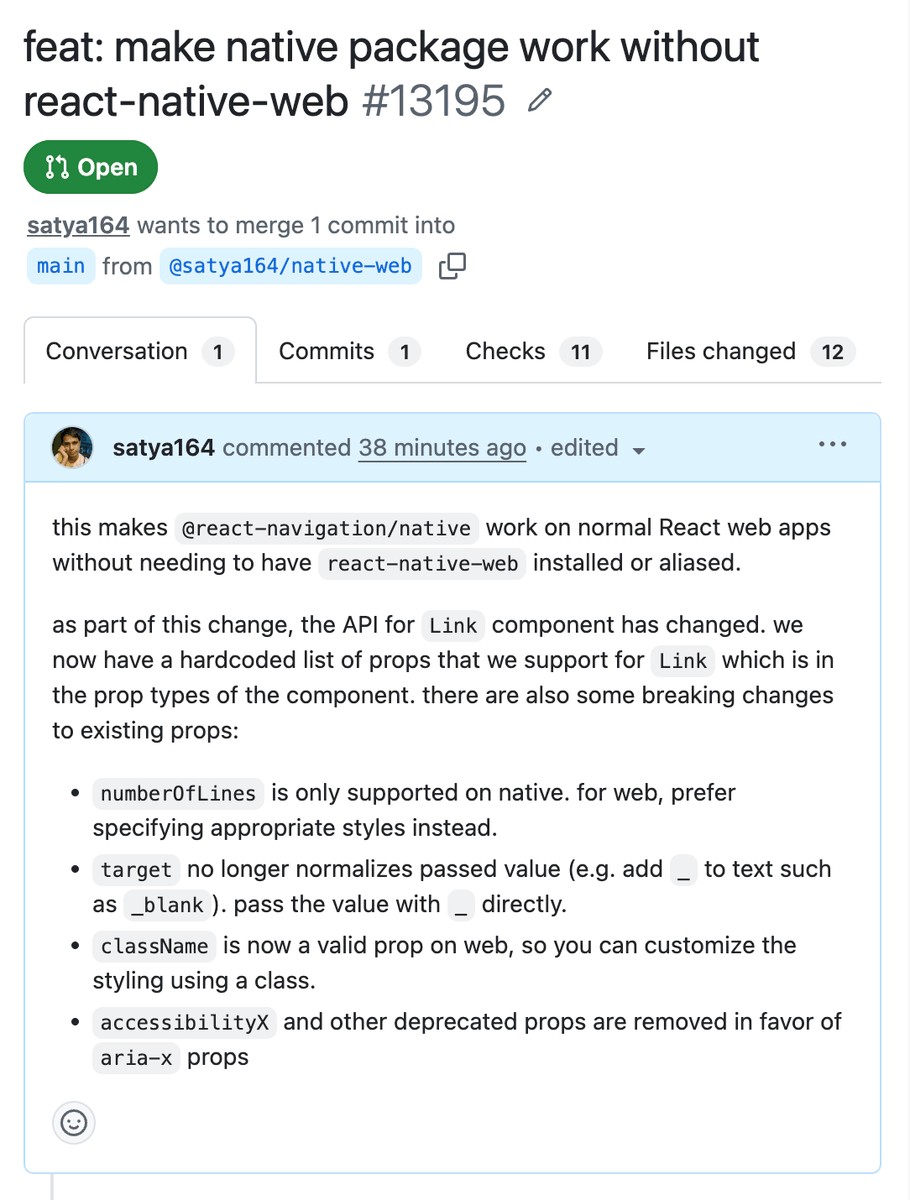
Soon @react-navigation/native will work on web without react-native-web! 👀
If you had issues with React Navigation's drawer not opening/closing correctly, check these versions out 👇 Thanks to the Reanimated team for the fix 🙏

We've released 3 patch releases of Reanimated with a fix for stale animated props for settled animations: ➡️ [email protected] ➡️ [email protected] ➡️ [email protected] github.com/software-mansi…

Marc @mrousavy
21K Followers 777 Following CEO @margelo_com – core contributor @reactnative – angel investor - hobby racing driver - I built VisionCamera, Nitro Modules and react-native-mmkv
Seb ⚛️ ThisWeekIn... @sebastienlorber
55K Followers 4K Following 🔥 Join 40k devs - Stay up-to-date with React: • 📨 https://t.co/DvLGHeLY5G • @ThisWeekInReact • @docusaurus maintainer • 🇫🇷
Krzysztof Magiera @kzzzf
15K Followers 610 Following R&D @swmansion. Made react-native (@meta), reanimated, rn-screens, Radon IDE, https://t.co/oO7e4kl04h
Jamon @jamonholmgren
35K Followers 4K Following Coding since 1992. Founder/CEO @infinite_red (US-based expert mobile/desktop/web dev), game dev @jammingames, hockey goalie, Lutheran, dad x4, gpa x1.
Tomasz Sapeta 𝝠 @tsapeta
7K Followers 338 Following Crafting software at @expo, formerly at @swmansion 🪄 Author of Expo Modules on iOS 🚀 Traveler by bike 🚴♂️🌍
Expo @expo
90K Followers 2K Following 𝝠 Expo is everything you need to build apps. ⭐️ Star the repo: https://t.co/lqFx3kh5nW 🤗 Signup for free!: https://t.co/NFVyuqBtvc

Enzo Manuel Mangano @reactiive_
12K Followers 475 Following design engineer @coinbase, https://t.co/nSyF0IT45e
Satyajit Sahoo @satya164
10K Followers 1K Following ♥️ CSS, JavaScript, TypeScript, React, React Native 💼 Front-end @Callstackio 🔨 Builds @ReactNavigation 🌍 Globe Earther 🏳️🌈 He/Him
Callstack Engineers @callstackio
17K Followers 393 Following We ship cross-platform products at AI speed. Training LLMs (Apex). React Native Core Contributors & React Foundation Members. Bringing you @AgentConf.
Aman Mittal🖖 @amanhimself
11K Followers 1K Following Documentation at 𝝠 @Expo | #ReactNative & #Expo enthusiast | Previously 🥑 @Draftbit 📝 @Vercel
brent @notbrent
17K Followers 3K Following Web/mobile developer working on Expo (https://t.co/7wMi8MNx8K) and React Native. He/him.
Oskar @o_kwasniewski
9K Followers 657 Following Co-Founder / CTO @TesterArmy (YC P26), previously @callstackio
Maciej Jastrzębski @mdj_dev
3K Followers 146 Following React Native at @callstackio — OSS: RN Testing Library — team console.log
Daniel Friyia 🇨�... @wa2goose
3K Followers 367 Following mobile dev @shopifyeng. opinions are my own. 💍 @aikayou
terry 🇺🇦 @terrysahaidak
2K Followers 444 Following React Native believer. @margelo_com, prev @rainbowdotme Opinions are only mine.

Christian Falch @chrfalch
3K Followers 794 Following Software Engineer at @Expo, React Native Core Contributor. React Native Skia
React Native Paper @rn_paper
4K Followers 17 Following React Native Paper is an open source UI component library implementing Material Design Guidelines for developing @ReactNative apps. Powered by @callstackio 🚀
4twiggers @4twiggers
2K Followers 209 Following
Emmanuel @esskay_dev
6 Followers 38 Following Frontend Engineer building intuitive mobile & web experiences
Oskar Pawica @O_Pawica
410 Followers 311 Following Currently working on React Native Reanimated at @swmansion
Sarath Sasikala @Sarath_Sasikala
7 Followers 243 Following
Eden @EdenTorinoxq7
0 Followers 41 Following
Wallpaper_x @animix_03x
0 Followers 30 Following 4K & HD Wallpapers 🎨 Daily Aesthetic Drops ✨ Mobile • Desktop • AMOLED Premium 4K Wallpapers 🔥 Daily Screen Upgrades ✨
Sanghoon Choi @SanghoonChoi82
1 Followers 14 Following
Eduardo Borges @euduardoborges
69 Followers 184 Following 12+ in tech @ staff engineer @wealthcounsel / baixinho / baiano
Emran Ibn Shayed @IbnShayed
17 Followers 172 Following "Soldier or Slut (Slavery),Your Life Your Choice" #EIS




Pratik @PratikMaraseni
90 Followers 371 Following
Krishna Kumar @Krishnatwt08
0 Followers 42 Following


Aquila Kadji @1Kadji_Aquila
3 Followers 70 Following Mobile dev (iOS/Android) → indie SaaS founder Building useful apps in public | Raw lessons, code & metrics | First SaaS coming soon DM open for mobil
sathyapriya @Sathyapriya31
114 Followers 56 Following



Oleksandr Sokolovskyi @OSokolovsk7870
0 Followers 49 Following
Loc Hang @hang_loc31
1 Followers 116 Following
Adirson Martinez @adimtnz
0 Followers 25 Following Co-Founder & CTO at Rial | Full-Stack Product Engineer | Building scalable mobile products, infrastructure & AI systems

Viblink @Viblink_
0 Followers 70 Following

Nahdi Abderrahmen @NahdiAbdou
2 Followers 51 Following
RaiN `# @rai_n70409
0 Followers 19 Following
Gary Chute @garychutejr
79 Followers 1K Following Made weak by time and fate, but strong in will To strive, to seek, to find, and not to yield.


Blade @BladeTanki79020
43 Followers 2K Following

dillonwatkins @dillonwatkinstx
814 Followers 4K Following Visionary idealist committed to American Dynamism and re-industrialization. Based in ATX.



Mukesh @MukeshPraj81318
44 Followers 117 Following software engineer → building https://t.co/Z4JjRHnCYg | coding is my playground | cooking Mobile apps & Web apps
S Club @s_club_7_fan
7 Followers 21 Following
Drew Montgomery @montgomery24523
1 Followers 833 Following
Đào Đỗ Thanh @ThanhDao2604
0 Followers 14 Following
Hùng @nice_vihun
2 Followers 281 Following

Jakac @JakaKralj138938
0 Followers 19 Following

PRAVEEN @praveencm06
2 Followers 111 Following
koushik hait @koushikhait49
0 Followers 63 Following
Abc @psch0493
0 Followers 51 Following
Krzysztof Magiera @kzzzf
15K Followers 610 Following R&D @swmansion. Made react-native (@meta), reanimated, rn-screens, Radon IDE, https://t.co/oO7e4kl04h
Expo @expo
90K Followers 2K Following 𝝠 Expo is everything you need to build apps. ⭐️ Star the repo: https://t.co/lqFx3kh5nW 🤗 Signup for free!: https://t.co/NFVyuqBtvc
Satyajit Sahoo @satya164
10K Followers 1K Following ♥️ CSS, JavaScript, TypeScript, React, React Native 💼 Front-end @Callstackio 🔨 Builds @ReactNavigation 🌍 Globe Earther 🏳️🌈 He/Him
brent @notbrent
17K Followers 3K Following Web/mobile developer working on Expo (https://t.co/7wMi8MNx8K) and React Native. He/him.
Kacper Kafara @kafara_kacper
268 Followers 49 Following React Native Open Source @swmansion. Leading `react-native-screens` project. Rust fan.
osdnk @mosdnk
2K Followers 909 Following Ph.D. studies in cryptology at @AaltoUniversity, crypto/mobile consulting, @reactnavigation // @usecapsule @rainbowdotme @swmansion @meta 🏳️🌈

Eric Vicenti @EricVicenti
5K Followers 1K Following CTO @seedhypermedia : Powering Decentralized Trust and Knowledge CommunitiesTrends for United States
You might like