Windows Latest @WindowsLatest
We provide all the latest news and reviews of Microsoft, Windows, Windows Phone, Surface and Xbox devices. We are not affiliated with Microsoft. windowslatest.com Joined July 2015-
Tweets14K
-
Followers58K
-
Following11
-
Likes444
More details in our story windowslatest.com/2026/09/15/win…
Microsoft just released emergency updates for Windows 11 to patch bugs introduced by the September 2026 update, including broken audio and Remote Desktop errors. After this month’s security updates, affected systems became unstable, with admins reporting Remote Desktop connection failures, sign-in problems, unresponsive servers, and related tools like MMC, File Explorer, Windows Update, and RDS Licensing Diagnoser freezing or refusing to respond. This is now being fixed with today's emergency update, and the same update also fixes Claude Cowork issues on Hyper-V shared-folder issues with Linux VMs and some multichannel USB audio problems, but Microsoft says one USB audio bug is still not fixed. September Patch Tuesday was already messy, and reports of other issues are still coming in. Microsoft hasn't confirmed broken File History, explorer exe crashes, and AMD GPU errors yet.

Windows 11's big September 2026 Update is causing major issues, and Microsoft has admitted that it's aware of three problems while it's investigating a fourth bug. 1. Anthropic says Windows 11 KB5124008 broke Claude Cowork's features. Microsoft later admitted that the update indeed has a bug causing issues with Claude and other Linux-based VMs. 2. Microsoft confirmed that some audio devices won't work, or the volume will remain at zero. 3. Remote Desktop Services might stop responding after Sept. 2026 security update. 4. Microsoft is also investigating reports of explorer exe crashes, particularly affecting enterprises. 5. Our findings suggest File History backups are now broken after the Windows Update. 6. We're also seeing reports of GPU issues on AMD systems. Microsoft is investigating multiple reports and has promised to release a fix soon. Windows 11 September Update bumps PCs to Build 26200.9445, and adds features like the movable taskbar, resizable Start menu, Bing-free search, faster File Explorer, and more. Everything we found in our investigation: windowslatest.com/2026/09/12/mic…

iPhone Duo’s photos could pass for Microsoft’s Surface Duo ads from 2020. Seriously. As soon as I started watching Apple’s foldable iPhone demo, it felt like déjà vu. The device opened like a miniature notebook, worked as two surfaces, ran two things at once, propped itself at different angles, worked hands-free, paired with a stylus, and kept switching between postures like a phone trying to become a larger productivity device. That was Surface Duo’s whole pitch in 2020! I compared the marketing images from Microsoft and Apple, and the similarities cannot be overlooked. - Book mode - Compose mode - Tent mode - Side-by-side apps - App Groups - Drag and drop between screens. Microsoft had already done the homework on what people might actually do with a pocketable productivity machine! Apple’s engineering is impressive, and the iPhone Duo is not a 1:1 copy. It has one flexible screen, an outer display, better hardware, and Apple’s own software work. But the use cases? AND the marketing? The “utility of two products into one” idea? They all come from Microsoft’s playbook. As for what I have to say to Apple, I guess it’s the Surface Duo’s tagline: Do one better! My findings so far: windowslatest.com/2026/09/11/iph…


If you look at the marketing material for the iPhone Duo on Apple’s website, many of them look eerily familiar to the Microsoft Surface Duo from 5 years ago! Apple can get away with anything and call it innovation! And it's not the first time...

iPhone Duo? Sorry, Apple. Microsoft did it first with the Surface Duo!


iPhone Duo? Sorry, Apple. Microsoft did it first with the Surface Duo!
Apple events are fun, and a foldable iPhone sounds interesting, but I still remember the hype around Windows Phone 8 and the Lumia 920 launch. That event felt like Microsoft and Nokia were about to change the smartphone market forever. What a time!
@pavandavuluri this is a banger release! can't wait for the next big update 🤩
Windows 11 just got five major new features with the September 2026 Patch Tuesday update! 1. Movable taskbar is finally here! You can now move it to the sides (vertical) or top of the screen, similar to Windows 10. 2. You can now make the taskbar smaller, similar to Windows 10. 3. You can now resize the Start menu, switch between Large and Small, or keep using Automatic (Microsoft picks a size based on your screen resolution). 4. You can now fully customize the Start menu! This means you can hide the Pinned section and Recommended feed, and just have the All apps list. 5. And Windows Search is getting a local-only feature, which disables Bing and Microsoft Store results. It's also a lot better at detecting typos and finding your apps and local files. Windows is so back, and Microsoft is finally listening to your feedback. Submit your ideas to the Feedback Hub! My hands-on with Windows 11's big update: windowslatest.com/2026/09/08/win…

More details in our story: windowslatest.com/2026/09/08/mic…
Microsoft is accused of showing a Harry Potter ad disguised as a wallpaper on Windows 11 PCs that use the Bing Wallpaper app. Bing Wallpaper is not installed by default, but it used to be a simple, clean app that did not quietly add ads to the desktop. However, over the past few months, Bing Wallpaper has been engaged in all sorts of sketchy stuff. Not long ago, we spotted that Bing Wallpaper added a feature that would open Bing .com if you clicked anywhere on the desktop. The feature was later pulled after outrage, and here we are again with another Bing Wallpaper controversy. Bing app displayed J.K. Rowling’s Harry Potter + Fantastic Beasts 11-film collection ad on September 7.

Windows 11 secretly supports animated profile pictures -- and it works in the Start menu and lock screen! Here's my Windows 11 lock screen with Monkey D. Luffy laughing 😂 By default, Windows takes your profile picture, converts it into a bunch of static resized copies, and uses those in places like Start, Settings, and the lock screen. But the registry entries behind those images still point to file paths. If you change those Image32, Image48, Image96, Image1080, and other values to your original GIF, Windows just reads that file instead! That means animated profile pictures and transparent PNGs work on Windows 11. To be clear, this is not an official Windows 11 feature, and Microsoft still does not support animated Microsoft account avatars. This is a local Windows workaround, so it's not something that changes your online Microsoft account picture. Maybe it is time for Microsoft to make profile pictures fun again, properly this time! How to enable it on any Windows 11 PC: windowslatest.com/2026/09/07/win…
A Microsoft Distinguished Engineer says “typing code is absolutely over,” which sounds like a hot take until you look at what Microsoft is actually building. David Fowler, who has been at Microsoft for decades and is a Distinguished Engineer, is not saying that software engineering is dead, but he believes that typing code is no longer necessary. And this lines up with where Microsoft’s developer tools are going: - GitHub Copilot has moved from autocomplete to coding agents that can work in their own environments, make changes, run checks, and open pull requests. - Aspire, the distributed app toolchain Fowler works on, is also being shaped around agents that can understand app structure, inspect logs, restart services, and debug broken flows instead of waiting for a human to paste errors back into chat. - Microsoft is also using AI models to secure Windows 11 amid rising AI-assisted threats. The company fixed more than 500 security issues in Windows 11 in a month using AI! At this point, Microsoft wants you to believe that “developers are moving up the stack.” Code is getting cheaper to generate, but deciding what to build, reviewing the architecture, checking security, understanding performance, and knowing when the AI is wrong are becoming more important. We’ve been tracking all of Microsoft’s AI developments and how they’re shaping Windows 11 for the future: windowslatest.com/2026/09/05/mic…

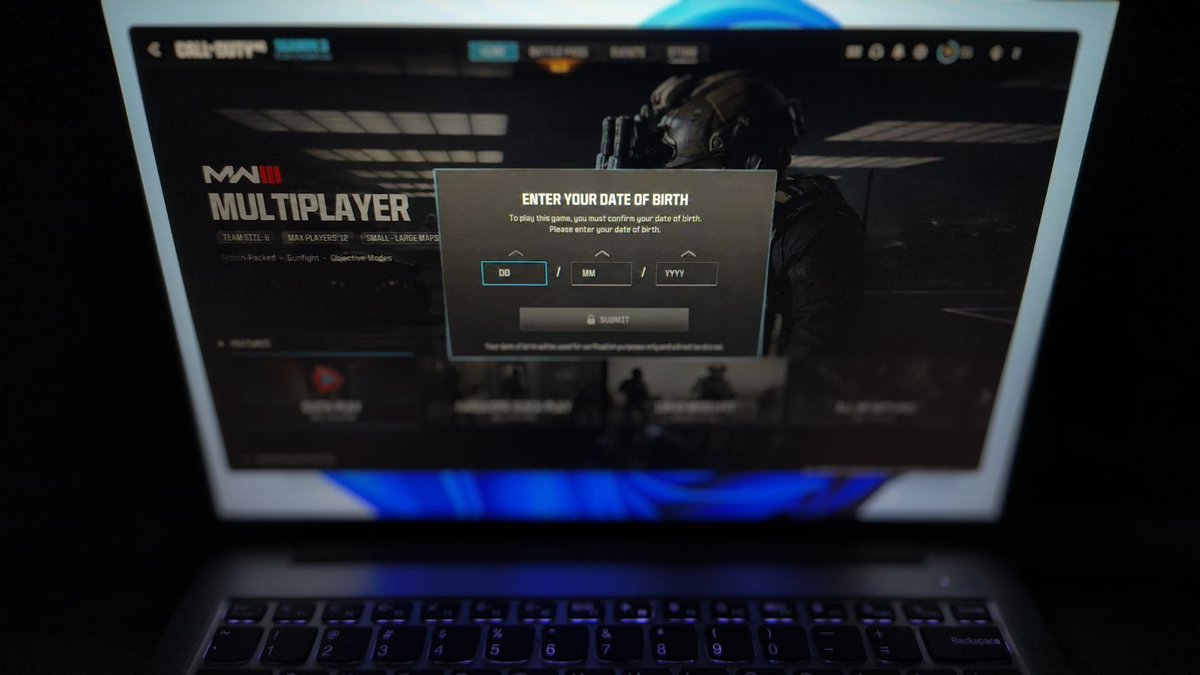
Microsoft confirms Windows 11 is getting a new age-check system for apps, but promises it won't leak your birthday. Microsoft is testing a new Windows Age API that lets apps ask Windows for your age group and restrict access based on local laws. Apps can also find out whether your age has already been verified. In the upcoming release, apps that use this new Windows API won't ask every user to enter their DOB, as Windows can return a broad signal like Under 10, 10–12, 13–15, 16–17, or 18+. The idea is child safety compliance, which is now required for apps with user-generated content, chat, media ratings, in-app purchases, or virtual currencies to adjust the experience based on age without building their own age-verification mess. Microsoft says the APIs are documented ahead of availability and will be enabled in a future Windows 11 release later this year. It's also worth noting that the feature is on Windows 11 PCs with a Microsoft account signed in, and apps must be registered with Microsoft’s Digital Safety platform before getting meaningful signals. Everything we know so far: windowslatest.com/2026/09/03/win…
Windows on Arm has had such an amazing journey, and credit where it’s due: Qualcomm and Microsoft made it possible by never giving up on the idea! I still remember when I wanted Windows Phones to remain a thing, and in 2017, at Computex, Qualcomm showed off this wonderfully crazy Snapdragon 835 prototype. It was a ridiculously thick phablet running full Windows 10, hooked up to a 46-inch monitor, keyboard, and mouse. (Sadly, Windows on mobile never happened, but that's a different story..) At the time, Windows on Arm still felt like an experiment, and not many entertained the idea. In fact, most dismissed it, even though it was trying to solve a problem we’ve all had with Windows, such as power consumption and poor battery life. And then there were other valid concerns about whether Windows could really move beyond x86 without giving up the apps and experience people expected from a PC. There were multiple attempts to push Windows on Arm. How many of you still remember the “Always Connected PCs” branding/campaign? It didn’t work particularly well, but all of that eventually led to the X2 Elite Extreme and similar chips. In 2026, we have powerful Snapdragon chips competing head-to-head with their rivals, and Microsoft has improved the Prism emulator, making x86/x64 emulation dramatically better. Native Arm64 support has exploded, and today there are 7,000+ verified apps and games compatible with Windows on Arm. Qualcomm says native apps now cover 93% of the time people spend in Windows apps, and Microsoft has now declared Windows on Arm a “first-class platform for any workload.”

Windows 95’s taskbar didn’t come from Steve Jobs’ NeXT Dock, and a former Microsoft VP explains what did For years, the Windows 95 taskbar has been compared to Steve Jobs' NeXT Dock, with some arguing that Microsoft simply copied the idea. But the guy who actually built it says that's not what happened. Former Microsoft VP Joe Belfiore recently set the record straight: "The NeXT dock did NOT lead to the taskbar. Two things did." He'd know. He ran the UI team on Chicago, the project that became Windows 95, and stayed at Microsoft for three more decades before retiring in 2022. One of those two things was Cairo, a Microsoft project that was eventually cancelled but left behind a bottom-of-screen "tray" for dragging files between apps. The other is that Windows 3.1 users kept losing track of minimized windows, so the taskbar buttons were built to fix that problem. Launching apps from them came years later (and we now call them pinned apps). Brad Silverberg, former Senior VP of Windows, backed up Belfiore's account as well. Here's the full story: windowslatest.com/2026/09/01/win…

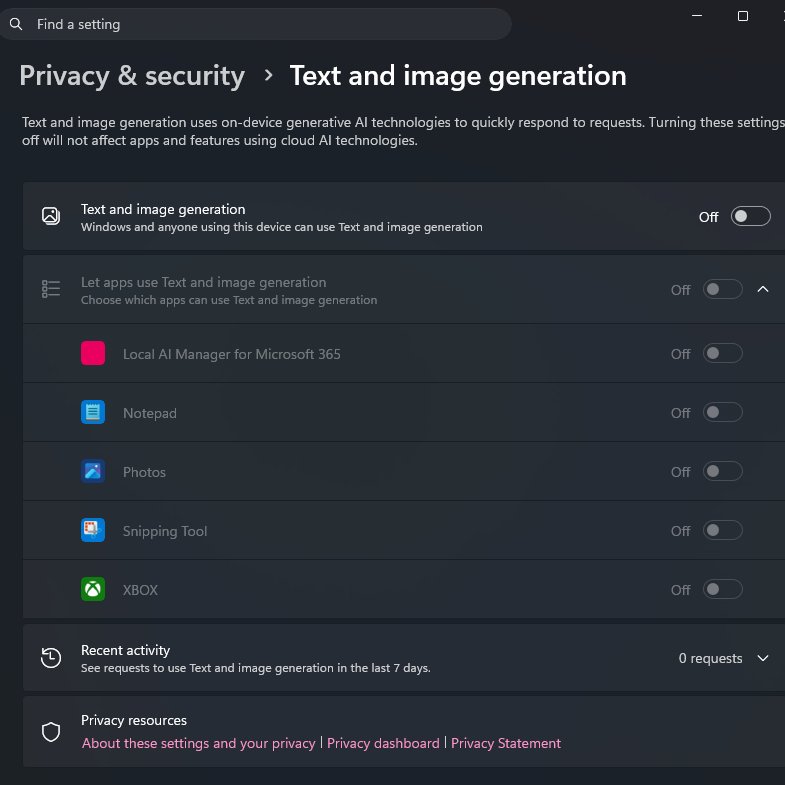
Fact check: False. Windows 11 is not quietly running AI on your PC and hurting gaming or streaming performance. We've written about what's actually going on, and why some X influencers are suddenly making this an issue: windowslatest.com/2026/08/30/win… TL;DR for those who can't read anymore: Windows 11 has a privacy page called "Text and image generation" for transparency on Copilot+ PCs with an NPU (40+ TOPS). This page also appears on regular PCs, again for the sake of transparency. The "Text and image generation" AI toggle does nothing on a regular PC. Even on Copilot+ PCs, on-device AI workloads use the NPU rather than your CPU, RAM, or GPU. Microsoft literally makes that obvious in the Settings page: Text and image generation uses on-device generative Al technologies to quickly respond to requests. Turning these settings off will not affect apps and features using cloud Al technologies. Most viral posts on X claim Windows is secretly using your RAM for AI and that you should toggle everything off. You can turn it all off if you want, but it won't make any difference on a regular PC. If you look closely at these viral posts, "Recent activity" is at zero. That alone tells you these supposed AI requests never happened on the "affected" PCs, so the claims that this feature is quietly consuming resources don't hold up. The privacy page exists so you can see whether an app is using your hardware for on-device AI. It does not monitor or block cloud-based AI. For example, ChatGPT in Chrome or Copilot in Edge works through the cloud, so that activity would not show up here. On a Copilot+ PC, if you open Paint and create an AI image using an on-device model, that activity can be logged here. Paint also warns you and asks for permission before using an AI model. It's a harmless privacy feature/page, but sure, Microsoft should have communicated better.
iPhone Duo? Sorry, Apple. Microsoft did it first with the Surface Duo!
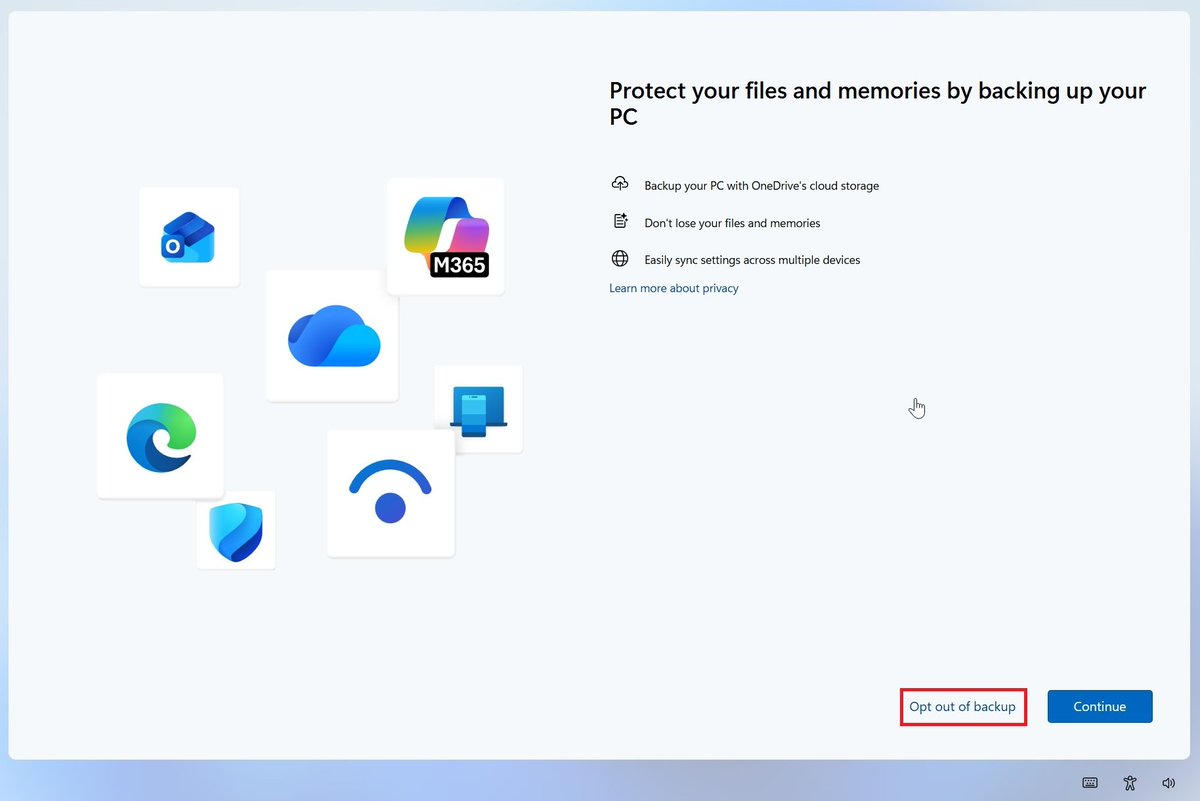
Windows 11 is dropping its worst OneDrive dark pattern: after years of complaints, Microsoft will finally let you opt out easily! We've spotted a new update rolling out on Windows 11 25H2, and it updates the OneDrive nudges with a new option that clearly says "Opt out of backup." Previously, you had options like "Skip for now," "Remind me in three days," or "Remind me later," while the second option was always "Continue." Microsoft recently promised that it would make Windows 11 calmer and reduce upsells. It looks like this is the first move in that direction, and you can now opt out of OneDrive, even if you were forced to sync in the past, with just one click! There are also plans to reduce overall upsells in Windows 11 and make the experience "calmer." Here's everything we spotted in our tests: windowslatest.com/2026/08/30/win…
It's quite unfortunate how people fall for an obvious scam. The account I quoted runs several accounts; they post false Windows news, then push it using their other accounts, and sell some PC booster software- and that too via Discord (probably to retain users and build a cult?).
Here's an article that explains what's going on with "Text and image generation" on Windows 11: windowslatest.com/2026/08/30/win…
Windows 11 is NOT using AI to "decrease your PC performance" or hurt gaming. First, the feature "Text and image generation" works only on Copilot+ PCs with an NPU (40+ TOPS). It literally says, "Text and image generation uses on-device generative AI technologies to quickly respond to requests." "On-device generative AI." Nothing is sent to the cloud! Even on Copilot+ PCs, it does not use your CPU, RAM, or GPU. It uses the NPU. Second, if these apps actually used resources or even called on-device AI models, which work on Copilot+ PCs only, you'd see it under "Recent activity." All the screenshots and videos going viral show Recent activity at ZERO requests. Pause the video or zoom in, and you'll notice! We've got plenty of reasons to criticize Windows, but let's not frame anything for the sake of engagement.


I had this shit enabled too and I didn't know about it

FireCube @FireCubeStudios
14K Followers 105 Following ・Developing & Designing GlowUI Windows Apps ・https://t.co/GPgZEhzWrI ・ https://t.co/T5eb1533FU Icon by: @lorisobidesign
Windows On Windows @wowstartsnow
27K Followers 2K Following The YouTube channel on the history & development of #Microsoft #Windows. 📺 Join the Discord @ https://t.co/Z4Rg1AoHmA! 👨🏻💻 Follow for daily Windows facts. 🤓 #WIMVP
MSPowerUser @mspoweruser
109K Followers 371 Following All things Microsoft, tech, AI, gaming, and more!
VideoCardz.com @VideoCardz
80K Followers 629 Following Not all frames are created equal. PC hardware rumors, leaks, and the latest news! Send a tip: https://t.co/ARSj7FBsSJ
Andres Vidoza @andres_vidoza
64K Followers 206 Following Telling a story with tech. | 📩 [email protected]

Christiaan F. @cornbreadcarson
1K Followers 2K Following Follower of Christ † | South African 🇿🇦 | Shade-tree tinkerer | Motorsports & history | Grok user
Sean R. @d0wnfal
96 Followers 314 Following
Anaëlle 🏳️�... @qnqelle
31K Followers 3K Following 25yo ~ French alt: @Traaanaelle 🥖 ~ priv: @dykesucker (mutuals only) 🍓
Natan @NatanFXz
0 Followers 22 Following
🔥 Chris 🔥 @cwtek
849 Followers 63 Following Geek, Firestick, Streaming, Windows, Android YouTube Content Creator find me at https://t.co/1vv2bG4tGN
ProofFlick @ProofFlick
23 Followers 30 Following Dictate the first draft. Proofread the final one. An app you pay for once. Free to try for 14 days, works with a free Groq key. Built by a dyslex1c F0unDAr
DaltonEastwood @EastwoodDalton
1K Followers 5K Following Este perfil es con fines meramente políticos, informativos y de entretenimiento. Nada de lo que publico/comento debe ser tomado con seriedad.
Eray @roines45
0 Followers 6 Following
Gcobani M Sitsheke @mgciba
35 Followers 123 Following I am only 1, I cannot do everything but I will not refuse to do something that I can do!!!!!
Obsession Studios @SoushiyanGtql
1 Followers 84 Following Welcome to Official Account of Obsession Studios
jeffegn @jeffegn
0 Followers 15 Following

Gaurav Kushwaha (Gk) @Gkgenius8420
20 Followers 2K Following Student at Dr. Virendra Swarup Institute of Computer Studies, Kanpur | UI/UX strategist, business planning, research, design thinking, wireframing, prototyping.
Tech and Business Syn... @tbsynergyhub
6 Followers 625 Following An emerging ecosystem connecting people, businesses,deas, technology,capital & opportunities.🚀Startups | Business | Innovation | Growth | Currently Building...
gbd @fbfqwh
1 Followers 3 Following
Helsing @Helsingmy
11 Followers 474 Following

AlaN @Al_an_044
0 Followers 4 Following
Matheusito @zezimdosteclado
10 Followers 46 Following

Aspo @micheleStrutto
0 Followers 13 Following
Cristian Bodiu @CristianBodiu3
1 Followers 7 Following

Tony D Truong Troicao... @troicaolenh00
201 Followers 3K Following Troicaolenh 07051976 gay male single by legal status, is troi last name , Troi Last name as brand new as USA citizens
big butts don't lie @shaaamus
199 Followers 34 Following Give me a tent, lamp soil and seeds and I'm happy, Im not in the market to buy and I will not subscribe so don't ask FFS #GrowYourOwn #legalizeIt #IDontSubsribe
Kevan @grabthat_ai
1 Followers 82 Following
tropple lopple @Sharpsh85697045
1 Followers 18 Following
Sérgio 🌟 @sterenas
84 Followers 349 Following
eyebrow cat @eyebrow_cat
1 Followers 433 Following

Khalil Tech @KhalilTech7
0 Followers 3 Following
wolfurb @wolfurb
0 Followers 62 Following
Dr Irfan @driqamar
10 Followers 227 Following Consultant Dental Surgeon/ Public Health Professional & a proud Pakistani
Rodney Watson @RodneyWatsklrd
59 Followers 110 Following
ssmichel @ssmichel4
5 Followers 205 Following Descascador de Abacaxi* Analista de Infraestrutura desde 1998
asfcore @asfcore_
0 Followers 113 Following
RosaryJoe @rosary_joe
0 Followers 136 Following
Aron Unwell @aronunwell
1 Followers 101 Following
Mikko @mikko_haapala
18 Followers 60 Following
Mark Hanratty @ma_hanratty
2 Followers 7 Following
Gory Ruin @GoryRuin
10 Followers 119 Following
Noris Duapuluh @Noris2puluh
0 Followers 2 Following
HaRd2BeAr @ToOHaRdToBeAr
12 Followers 73 Following

Gentle_Reader @Gentle__Reader
17 Followers 536 Following Favourite Genres: Epic & Urban Fantasy, Sci-Fi, Humour & Comedy, Mythology, Fictional History, Fairy Tales, Horror, Crime, Paranormal Fiction, Mystery & Adult.

Daniel Syer @DanielSyer
2 Followers 70 Following
sravanthi namburi @namburi37043
0 Followers 27 Following
Windows Central @WindowsCentral
732K Followers 60 Following 20 years of covering Microsoft, Windows, Xbox, and PC gaming. Tips: [email protected] | Gaming: @WinC_Gaming | Not part of Microsoft.

Windows Insider Progr... @windowsinsider
163K Followers 298 Following Official Twitter of the Windows Insider Program, a community of tech enthusiasts and experts, IT pros, and developers helping to shape the future of @Windows.
Microsoft @Microsoft
13.1M Followers 1K Following We're on a mission to empower every person and every organization on the planet to achieve more. Support: @MicrosoftHelps
MSPowerUser @mspoweruser
109K Followers 371 Following All things Microsoft, tech, AI, gaming, and more!
Windows Update @WindowsUpdate
91K Followers 508 Following Sharing the latest Windows as a service updates. For immediate assistance, please reach out to @MicrosoftHelps.
VideoCardz.com @VideoCardz
80K Followers 629 Following Not all frames are created equal. PC hardware rumors, leaks, and the latest news! Send a tip: https://t.co/ARSj7FBsSJ


Mayank Parmar @mayank_jee
2K Followers 674 Following Entrepreneur & founder of @WindowsLatest.com. Decoding AI at @BleepinComputer. Head of Audience Development at Search Engine Watch. Cited by CNN, Forbes & more.You might like