

Seng hong @Hongprogrammer
Like on Javascript, Typscript, C#, Vue, Nuxt, NestJS, Nuxt, ExpressJS, dotNet Core, SQL Server, Mysql, Postgresql, Firebase. senghong.pages.dev Cambodia Joined July 2023-
Tweets13
-
Followers18
-
Following658
-
Likes5K

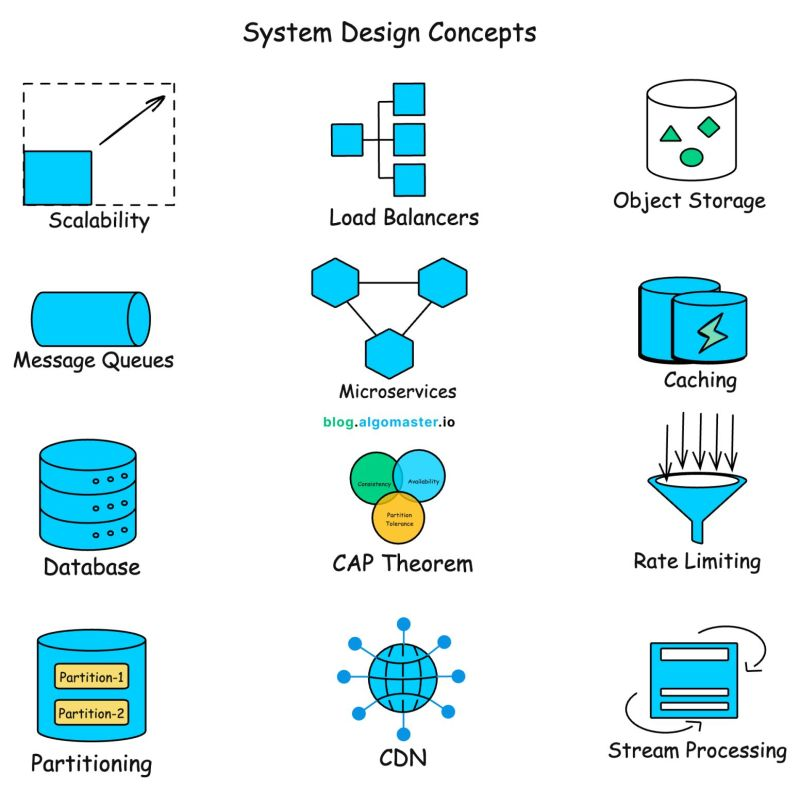
If you want to get started with system design, learn these 101 concepts (save now):


System design fundaments - Day 40 - Putting Altogether. How a Request Travels Through a Modern Production System You have learned about: - DNS - CDN - Load Balancer - API Gateway - Redis - Database Connection Pool - Circuit Breaker - Bulkhead - Retry - Rate Limiting - Compression - Health Checks But how do they all work together? Let's follow a single request. A user clicks: https://shop[dot]example[dot]com The journey begins. Step 1 -DNS Resolution The browser asks: Where is shop[dot]example[dot]com? DNS returns the IP address. Browser │ ▼ DNS │ IP Address Step 2 - CDN The request reaches the CDN. Browser │ ▼ CDN If a cached image, CSS or JS exists: Cache Hit Return Immediately Otherwise: Cache Miss Forward Request Step 3 - WAF & Rate Limiter Before reaching your application: CDN │ WAF │ Rate Limiter Checks include: ✔SQL Injection ✔DDoS ✔Bot traffic ✔Request limits If the client exceeds limits: HTTP 429 Step 4 - Load Balancer Traffic reaches: Load Balancer It chooses a healthy server using algorithms such as: - Round Robin - Least Connections - Weighted Round Robin Unhealthy servers are skipped. Step 5 - Application Server The request enters Spring Boot. Spring Boot Authentication happens. Business logic starts. Step 6 - Redis Cache Application checks Redis. Redis Hit? If: YES Return Data Otherwise: Read Database Step 7 - Connection Pool Instead of creating a database connection: Borrow Connection From: HikariCP Execute SQL. Return connection. Step 8 - Database The query executes. Application ↓ PostgreSQL Data is returned. Redis may cache the result. Step 9 - External Services Suppose Checkout calls: Payment Inventory Shipping Before calling: Timeout ↓ Bulkhead ↓ Retry ↓ Backoff + Jitter ↓ Circuit Breaker ↓ Payment Service Every layer protects the system differently. Step 10 - Response Application returns: JSON Nginx compresses it using: Brotli or Gzip Browser automatically decompresses it. The Complete Production Flow Browser │ DNS │ CDN │ WAF │ Rate Limiter │ Load Balancer │ Spring Boot │ Redis │ Connection Pool │ Database │ External Services │ Circuit Breaker │ Compressed Response │ Browser Why This Architecture Works Every layer has one responsibility. DNS Find the server. CDN Reduce latency. Rate Limiter Prevent abuse. Load Balancer Distribute traffic. Redis Reduce database load. Connection Pool Reuse expensive connections. Bulkhead Isolate resources. Retry Recover from temporary failures. Circuit Breaker Stop cascading failures. Compression Reduce network transfer. Together they create systems that are: ✔ Fast ✔ Scalable ✔ Resilient ✔ Highly Available Key Takeaway Modern backend systems aren't built around one technology. They are built by combining multiple layers, each solving a specific problem. A single user request may pass through 10+ infrastructure components before the response reaches the browser. Understanding how those layers fit together is what separates learning individual concepts from understanding real-world system design. Tomorrow we begin next Phase, focusing on Messaging, Event-Driven Architecture, Kafka, RabbitMQ, Sagas, and Distributed Systems.

System Desing- Event Driven Architecture & Messaging – Day 41 Why Message Queues? The Problem with Synchronous Communication Your application has grown into multiple microservices. A customer places an order. Your Order Service immediately calls: - Payment Service - Inventory Service - Email Service - Notification Service - Analytics Service Everything happens synchronously. Client │ Order Service ├──► Payment ├──► Inventory ├──► Email ├──► Notification └──► Analytics Looks fine... Until one service becomes slow. Suppose the Email Service takes 5 seconds to respond. Now this happens: Order Service │ Waiting... │ Email Service The customer keeps waiting. Even though the payment was successful. One slow service delays the entire request. Now imagine the Email Service goes down. Order Service │ Email Service ✖ Should the customer be unable to place an order just because an email couldn't be sent? Of course not. This is where Message Queues come in. Instead of calling every service directly... The Order Service publishes a message. Order Created │ ▼ Message Queue Other services consume it independently. Message Queue / | \ ▼ ▼ ▼ Email Inventory Analytics Now: ✔ Customer receives a response immediately. ✔ Email can be sent later. ✔ Analytics can process independently. ✔ Inventory updates asynchronously. Why Message Queues? 1. Decoupling Services no longer depend on each other's response time. 2. Better Performance The client doesn't wait for every downstream operation. 3. Better Reliability If Email is temporarily unavailable: The message stays in the queue. It can be processed later. 4. Better Scalability Need more throughput? Add more consumers. Queue │ ├──► Worker 1 ├──► Worker 2 ├──► Worker 3 Real Example When you order on Amazon: You immediately receive: "Order Placed Successfully" But behind the scenes... - Payment processing - Inventory updates - Shipping - Invoice generation - Recommendation updates - Email notifications don't all happen in a single synchronous request. Many of these tasks are handled asynchronously. Synchronous vs Queue-Based Synchronous Order │ Payment │ Inventory │ Email │ Notification One slow service affects the entire chain. Queue-Based Order │ Queue ├──► Payment ├──► Inventory ├──► Email └──► Analytics Each consumer works independently. Key Takeaway Message queues don't make systems faster by themselves. They make systems more resilient, scalable, and loosely coupled. Instead of waiting for every task to finish... Applications can acknowledge the request quickly and process non-critical work asynchronously. That's why almost every large-scale distributed system relies on messaging. Tomorrow we will compare the three most popular messaging systems: Kafka vs RabbitMQ vs ActiveMQ


Nuxt 4.5 is out, and it's a big one. 🚀 - ⚡️ Vite 8 - 🦀 Rspack 2, now powered by Rsbuild - 🌊 experimental SSR streaming for faster TTFB - 🩺 a new stable error code system - 🎨 useLayout + named views ... plus a lot of groundwork for Nuxt 5! 💚💚💚 nuxt.com/blog/v4-5
HTTP REQUEST & RESPONSE STRUCTURE IN API DESIGN 1. HTTP REQUEST OVERVIEW A client sends an HTTP request to communicate with the server. → Requests ask the server to perform an action → Every request follows a standard structure → The server processes the request and returns a response → Requests are the foundation of REST APIs Understanding request structure is essential for API development. 2. REQUEST URL The URL identifies the resource the client wants to access. → Specifies the API endpoint → Identifies a collection or individual resource → May include path parameters → Should be clean and meaningful Examples: → /users → /users/123 → /products/45/reviews URLs should represent resources rather than actions. 3. HTTP METHOD The HTTP method tells the server what action to perform. → GET → Retrieve data → POST → Create data → PUT → Replace data → PATCH → Update data partially → DELETE → Remove data Choosing the correct method ensures RESTful API design. 4. REQUEST HEADERS Headers provide additional information about the request. Common Headers: → Content-Type → Accept → Authorization → User-Agent → Cache-Control Headers help the server understand how to process the request. 5. PATH PARAMETERS Path parameters identify a specific resource. Example: → /users/123 → /orders/456 → /products/89 Path parameters are part of the URL and are required to locate resources. 6. QUERY PARAMETERS Query parameters filter, search, or sort returned data. Examples: → /users?page=2 → /products?category=laptops → /orders?status=completed → /users?sort=name Query parameters provide flexible data retrieval. 7. REQUEST BODY The request body contains data sent to the server. → Commonly used with POST → Used with PUT and PATCH updates → Usually formatted as JSON → May contain files or form data when required Example JSON: → { → "name": "Alice", → "email": "[email protected]" → } The request body carries the information needed to create or update resources. 8. HTTP RESPONSE The server returns a response after processing the request. A response typically includes: → Status Code → Response Headers → Response Body Responses tell the client whether the request succeeded or failed. 9. RESPONSE STATUS CODES Status codes indicate the outcome of a request. → 200 → Success → 201 → Resource Created → 204 → No Content → 400 → Bad Request → 401 → Unauthorized → 403 → Forbidden → 404 → Not Found → 500 → Internal Server Error Status codes allow clients to handle responses correctly. 10. RESPONSE HEADERS Response headers provide metadata about the returned data. Common Headers: → Content-Type → Content-Length → Cache-Control → ETag → Location Headers improve communication between clients and servers. 11. RESPONSE BODY The response body contains the returned resource or error information. Successful Example: → { → "id": 123, → "name": "Alice", → "email": "[email protected]" → } Error Example: → { → "error": "User not found" → } Response bodies should be consistent and easy to understand. 12. COMPLETE REQUEST–RESPONSE FLOW A typical API interaction follows these steps. → Client sends an HTTP request → Server validates the request → Server processes business logic → Database is queried or updated → Server generates a response → Client receives the response and updates the application A clear request-response flow makes APIs reliable and predictable. BENEFITS OF A WELL-STRUCTURED API → Easier debugging → Consistent communication → Better developer experience → Improved scalability → Simpler integration with frontend and mobile applications Get the complete API Design ebook: codewithdhanian.gumroad.com/l/nbfkk


Node.js apps often break in production because the server environment doesn't match your local setup. In this tutorial, Zia shows how to containerize a Node.js API with Docker and deploy it with GitHub Actions. You'll use Docker, Docker Compose, PostgreSQL, Docker Hub, and a CI/CD pipeline that runs on every merge to main. freecodecamp.org/news/container…

Access Token ≠ Refresh Token ≠ ID Token They often appear together in OAuth 2.0 and OpenID Connect flows... But each has a completely different job. Here's the easiest way to remember them Access Token ➜ Gives you access to protected APIs and resources. Refresh Token ➜ Gets you a new Access Token when the current one expires. ID Token ➜ Tells the client application who the authenticated user is. Quick memory trick - Access Token = Access APIs - Refresh Token = Get New Access - ID Token = User Identity How do they work together? Imagine you log into an application using OpenID Connect: User logs in ⬇️ Authorization Server authenticates the user ⬇️ Client receives tokens Access Token → Sent to the API Refresh Token → Used to obtain new tokens ID Token → Used by the client to understand the user's identity ⬇️ Access Token expires ⬇️ Refresh Token → New Access Token The user can continue without logging in again. The most common mistakes ❌Using an ID Token to authorize API requests ❌Sending a Refresh Token to your resource APIs ❌Treating all tokens as if they have the same purpose The key distinction Access Token answers: 👉 "Can I access this API?" Refresh Token answers: 👉 "Can I get a new Access Token?" ID Token answers: 👉 "Who just authenticated?" One sentence to remember forever Access Token gets you access. Refresh Token gets you new access. ID Token tells the client who you are. Understanding this difference makes OAuth 2.0 and OpenID Connect much easier to reason about.

System design series - Caching and performance - Day 32 Database Connection Pooling: Why We Don't Open a New DB Connection for Every Request Imagine your API receives 10,000 requests. For every request, the application does this: Request ↓ Open DB Connection ↓ Execute Query ↓ Close Connection Looks reasonable. But there is a problem. Creating a database connection is expensive. It can involve: - TCP connection setup - TLS handshake - Authentication - Database session initialization Doing this for every API request wastes time and resources. That's why applications use a Connection Pool Without Connection Pooling Imagine 1,000 users sending requests. Request 1 → Create Connection → DB → Close Request 2 → Create Connection → DB → Close Request 3 → Create Connection → DB → Close ... Request 1000 → Create Connection → DB → Close Every request creates a new connection. Result: ❌Higher latency ❌More CPU usage ❌Database connection exhaustion ❌Poor scalability With Connection Pooling Instead of constantly creating connections... The application creates a pool of reusable connections. Application │ ▼ Connection Pool [Conn 1] [Conn 2] [Conn 3] [Conn 4] [Conn 5] │ ▼ Database When a request arrives: Request ↓ Borrow Connection ↓ Execute Query ↓ Return Connection to Pool The connection stays alive. The next request reuses it. Much faster. What Happens When All Connections Are Busy? Imagine your pool size is: Maximum Connections = 10 And all 10 connections are currently being used. Request #11 arrives. It doesn't immediately create unlimited new connections. Instead, it usually waits for a connection to become available, up to a configured timeout. 10 Connections ↓ All Busy ↓ New Request ↓ Wait ↓ Connection Available ↓ Execute Query If the wait exceeds the timeout, the request fails with a connection acquisition error. This protects the database from being overwhelmed. The Dangerous Mistake Some developers think: "More connections = better performance." Not always. Imagine: 10 App Servers Each server has: 100 DB Connections Your database could receive: 10 × 100 = 1,000 connections If the database can efficiently handle only 300... You have created a scalability problem. Connection pool sizing matters. Java + Spring Boot Spring Boot commonly uses HikariCP as its JDBC connection pool. Your application flow typically looks like: Spring Boot │ ▼ HikariCP │ ▼ Database Instead of creating database connections manually... HikariCP manages: - Connection creation -Connection reuse - Idle connections - Maximum pool size - Connection timeout - Connection lifetime Important Pool Settings - Maximum Pool Size How many connections can exist in the pool? - Minimum Idle How many idle connections should remain ready? - Connection Timeout How long should a request wait for a connection? - Idle Timeout How long can an unused connection stay idle? - Max Lifetime How long should a connection exist before being replaced? Key Takeaway Database connections are expensive resources. Connection pooling makes them reusable. Instead of: Create → Use → Destroy We do: Borrow → Use → Return → Reuse But the goal isn't to create the biggest possible pool. The goal is to create a properly sized pool that protects your database while keeping requests flowing efficiently. Tomorrow: Compression — Gzip vs Brotli: How websites send fewer bytes over the network.


𝟯𝟬 𝗕𝗹𝗼𝗴𝘀 𝘁𝗼 𝗟𝗲𝗮𝗿𝗻 𝟯𝟬 𝗦𝘆𝘀𝘁𝗲𝗺 𝗗𝗲𝘀𝗶𝗴𝗻 𝗖𝗼𝗻𝗰𝗲𝗽𝘁𝘀: 1. APIs: lnkd.in/dsbwPZ6N 2. API Gateways: lnkd.in/gtyXmvf4 3. JWTs: lnkd.in/ghtXYRqU 4. Webhooks: lnkd.in/geHxGX-7 5. REST vs GraphQL: lnkd.in/gM5VHKQS 6. Load Balancing: lnkd.in/gvxfwEUr 7. Proxy vs Reverse Proxy: lnkd.in/gMTtidBq 8. Scalability: lnkd.in/gPGhW-qK 9. Availability: lnkd.in/gQk2p4_6 10. SPOF: lnkd.in/gw_uHZWn 11. CAP Theorem: lnkd.in/g_tFqJJb 12. SQL vs NoSQL: lnkd.in/gHyC9qWc 13. ACID Transactions: lnkd.in/dB3QHiMz 14. Database Indexes: lnkd.in/g_-bQWtA 15. Database Sharding: lnkd.in/g9mc-d5m 16. Consistent Hashing: lnkd.in/gR9wFDpz 17. CDC: lnkd.in/gWhGwh9Z 18. Caching: lnkd.in/gBSeTstS 19. Caching Strategies: lnkd.in/dVk7nZ_Y 20. Cache Eviction Policies: lnkd.in/gQAEXEmq 21. CDN: lnkd.in/gaW4Vkpy 22. Rate Limiting Algorithms: lnkd.in/gYDxg8XY 23. Message Queues: lnkd.in/g-jnNGDC 24. Bloom Filters: lnkd.in/gfGjCrSZ 25. Idempotency: lnkd.in/gDB3AJij 26. Concurrency vs Parallelism: lnkd.in/gGZXhjBD 27. Long Polling vs WebSockets: lnkd.in/d9xKD28K 28. Stateful vs. Stateless Architecture: lnkd.in/gz_ccK-Y 29. Batch vs Stream Processing: lnkd.in/gKtj_qWh 30. Geohashing: lnkd.in/gjSbKdpN 🔁 Repost to help a friend. 📌 Save this post for later.
Rate Limiting ≠ Throttling ≠ Backpressure These three terms are often used interchangeably… But they solve completely different scaling problems. Here's the easiest way to remember them: Rate Limiting ➜ Controls how many requests a client is allowed to send. Throttling ➜ Controls how fast your system processes requests when it's under load. Backpressure ➜ Lets a slow consumer tell a fast producer to slow down to avoid overload. Quick memory trick 👇 - Rate Limiting = Limit Requests - Throttling = Slow Processing - Backpressure = Flow Control --- Where is each used? - Rate Limiting API Gateways Public APIs Login endpoints Prevent abuse and DDoS Typical response: HTTP 429 Too Many Requests - Throttling Background jobs Database-heavy services CPU-intensive operations Protect downstream systems during traffic spikes - Backpressure Kafka consumers Reactive Streams Event-driven architectures Streaming pipelines Prevent queue overflow when producers are faster than consumers --- Real-world example: Imagine an online ticket booking platform during a concert sale: Rate Limiting → Each user can send only 100 requests per minute. Throttling → The booking service intentionally processes requests at a safe rate when the database is overloaded. Backpressure → If the notification service falls behind, the event stream slows producers instead of flooding queues with millions of messages. --- The biggest misconception: Rate Limiting protects your API from clients. Throttling protects your service from overload. Backpressure protects downstream consumers from fast producers. They often work together, not instead of each other. --- One sentence to remember forever: Rate Limiting = Too many requests. Throttling = Process more slowly. Backpressure = I'm overwhelmed slow down. These are fundamental concepts behind scalable systems like Netflix, Uber, Amazon, and Kafka-based event-driven architectures. Saved this handwritten cheat sheet for backend engineers and system design enthusiasts


DeployIT - DLowCode @DeployIT_
112 Followers 1K Following 💼 Software for finance and more 📌 Proprietary DLowCode platform 🚀 Flexible custom development + fast low-code ⚡ BPMN (Camunda), drag & drop, rules in Excel

Henrietta @Balarwa3425714
190 Followers 7K Following Like to talk Do not hold any investment products
Antonia @wHn265qoLtvktQ
35 Followers 1K Following

Sausmer @Sausmerxf3
3 Followers 181 Following
FlutterLab @FlutterLabHQ
49 Followers 940 Following A group of developers, with the aim to help companies to develop their mobile apps faster, with a better time to market and with only one code thanks to Flutter
Tetoos @Tetoos175386
26 Followers 1K Following I live alone now and enjoy business, traveling, shopping, food and music. I have a calm personality and I hope we can be friends.
Soga(Flutter)💙 @soga_pg_en
410 Followers 482 Following Flutter Widget(iOS・Android) I love Flutter & Swift,| Japanese system engineer
NoCode Videos @NoCodeVideos
375 Followers 5K Following The latest #NoCode Video Tutorials, Resources, & Reviews
No Code Tutorials @NoCodeTutorials
505 Followers 5K Following A collection of the most useful #nocode tool tutorials.
Bilal Ahmed @bilalah0027
94 Followers 625 Following Flutter || Mobile Application Developer|| Getx || Provider || MVVM || RESTful APIs Integration || Firebase ||SQL Database || Hive

Raitis Šaripo 🌶�... @RaitisSaripo
282 Followers 280 Following Raitis all day .. iOS & Flutter Developer at @ChiliLabs 🌶 Creator of Kitchenette: Kitchen Manager 🧑🍳⏲ & Orbit Guard: Galaxy Guardian 🪐
Ayesh Chathuranga @SD_Ayesh
8K Followers 7K Following Founder & CEO💺at Nebula Infinite🌟 Software Company 🏬 in Sri Lanka 🇱🇰 | Software Engineer 🧑💻 | Freelancer 💻🌐 | Graphic Designer 🧑🎨 | Entrepreneur 💼

Csongor Vogel 💙 @GerfalconVogel
1K Followers 1K Following Staff Engineer @Talabat @deliveryherocom | @GoogleDevExpert for Flutter | Uni Lecturer @unibme_official | Organizer @Flutter_AD Meetup 🇦🇪
QueenAi @QueenAi2024
146 Followers 314 Following
The ASF - Apache Soft... @TheASF
67K Followers 212 Following The global home for open source software, powering some of the world’s most ubiquitous software projects in web, big data, Java, IoT, cloud computing, and more.
Swift Language @SwiftLang
80K Followers 0 Following Swift is a general-purpose programming language that's fast, modern, safe, and a joy to write. Designed for all, developed in the open.

Rod Johnson @springrod
34K Followers 808 Following Building the future of agent frameworks at Embabel. Creator of Spring. Developer, Entrepreneur, Investor, Author. https://t.co/IBqJ1rMmFe
Testcontainers @testcontainers
13K Followers 28 Following Testcontainers is an OSS library that finally makes integration testing easy. Try it now https://t.co/8h6Ke2BauG
Hibernate @Hibernate
27K Followers 35 Following The Hibernate team behind the suite of open source Java libraries around domain models. @hibernate.org (bsky)
Sharat Chander @shara... @Sharat_Chander
21K Followers 5K Following 🇺🇸 🇺🇦 | LEGACY VERIFIED | #Java #DevRel leader | 💜 @u2 & @DepecheMode | @UofMaryland & @LoyolaMaryland grad | Views are my own
Rafael del Nero @RafaDelNero
16K Followers 623 Following Java Champion helping mid-to-senior Java developers build international careers. 25+ mentee results in 15+ countries. ↓ Apply for a Career Diagnosis ↓
Aleksey Shipilëv @shipilev
28K Followers 582 Following In love-hate relationship with machines. Doing questionable things, so you don't have to. Personal: astrophotos + basic gloom. Work: everything OpenJDK at AWS.
Hadi Hariri @hhariri
40K Followers 722 Following SVP of Operations @ JetBrains. Find me on LinkedIn. https://t.co/t1SXNSdrYH
Markus Eisele @myfear
30K Followers 2K Following Something at @IBMResearch. Legal thinks you need to know that I'm speaking for myself here. I believe you knew.
Vadym Kazulkin @VKazulkin
45K Followers 2K Following Husband, papa of 3 | public speaker | AWS Serverless Hero | huge Java fan | 👨💻 @iplabsDE | Co-Org @JUGBonn. On intersection of people, business & technology.
Bruno Borges @brunoborges
36K Followers 1K Following Brazilian Immigrant 🇨🇦🇧🇷🇺🇸 Java Champion. $MSFT Product Manager for DevRel. Previously @OracleDevs, #Azure DevRel, MSFT OpenJDK. Helps @GitHubCopilot now
Tagir Valeev @tagir_valeev
23K Followers 154 Following @JetBrains/@Java/@IntelliJIDEA В основном пишу про детушек. Моя детская книга: https://t.co/w7iM9ACAdw
Baeldung @baeldung
77K Followers 877 Following Passionate about everything Java. Teaching on https://t.co/vh3oOY6RZE. Java Champion.
Venkat Subramaniam @venkat_s
67K Followers 417 Following Programmer, author, speaker, founder Agile Developer, Inc., co-founder of @dev2next Conference, professor @CSatUH

OpenAI Developers @OpenAIDevs
433K Followers 1 Following Official updates for developers building with Codex & the OpenAI Platform • Service status: https://t.co/kZwnwdYYEq
Cisco @Cisco
721K Followers 3K Following Official info on Cisco news, events and technology innovation. For help, reach out to @HeyCisco.
SAP @SAP
297K Followers 147 Following We bring out the best in every business. | Privacy Statement: https://t.co/aceUYW4DWh Personal attacks, harassment, private info, or threats will be removed.
Oracle Exadata @OracleExadata
25K Followers 376 Following Modernize database infrastructure, move enterprise applications to the cloud, and rapidly implement digital transformations with Oracle #Exadata.
Oracle @Oracle
828K Followers 789 Following With industry-leading cloud and AI, we help people see data in new ways, discover insights, unlock endless possibilities.
Siva @sivalabs
15K Followers 320 Following 💻 Pragmatic Software Developer | ☕ Developer Advocate @JetBrains | https://t.co/BDIwltQgQ3 | https://t.co/aQz0JrvXbH
Bilgin Ibryam @bibryam
85K Followers 880 Following Building agentic infrastructure. Writing about AI-assisted coding and agentic systems. Product manager @soloio_inc. I publish The Generative Programmer
Mario Fusco @mariofusco
51K Followers 334 Following Java Champion ~ Open source advocate ~ Frequent speaker ~ @jugmilano coordinator ~ @QuarkusIO and @langchain4j committer at @IBM ~ Pragmatic dreamer ~ Europeist

Javarevisited @javarevisited
87K Followers 384 Following @Java blog & @Medium https://t.co/e0eEKjA8gJ books - https://t.co/OvnHDk6iZC substack - https://t.co/PfAsZNVzmp courses - https://t.co/nnIp2j69RN
Gunnar Morling 🌍 @gunnarmorling
71K Followers 300 Following Technologist @Confluentinc · Ex-lead of Debezium · Spec lead of Bean Validation 2.0 · Creator of Hardwood, kcctl, JfrUnit, MapStruct · Java Champion · 🚴
Jakob Jenkov @jjenkov
25K Followers 150 Following Software Architect, Design Thinker, Java Champion. https://t.co/s4Vz7PU2CL
javinpaul @javinpaul
106K Followers 7K Following Blogger - https://t.co/Cxgp9zzN3y Creator - https://t.co/GYls4Lx9DW newsletter - https://t.co/P8jiQ5GW16 youtube - https://t.co/vs4WjwaEQ6
Piotr Mińkowski @piotr_minkowski
14K Followers 82 Following Software Architect · Blogger · YouTube https://t.co/xbpyWyoJV1 · Author: Mastering Spring Cloud, Hands-On Java with Kubernetes
Vlad Mihalcea @vlad_mihalcea
94K Followers 150 Following @Java Champion, author of High-Performance Java Persistence and @Hypersistence Optimizer. Blogging at https://t.co/GWdHta4mMO
Dan Vega @therealdanvega
26K Followers 7K Following 🍃 Spring Developer Advocate @Broadcom ☕️ Java Champion 📹 YouTuber https://t.co/1qzY9JT3ct 📗 Author https://t.co/FRQ7El2qJK 🎙️ Podcast https://t.co/z0vkODhi20
IntelliJ IDEA, a JetB... @intellijidea
158K Followers 23 Following The Leading IDE for Pro Java and Kotlin Development, by @JetBrains Tips: #IntelliJIDEATips New Features: #NewInIntelliJIDEA Our YT channel https://t.co/GuAlWUIi7Q
Andrew Ng @AndrewYNg
1.9M Followers 1K Following Co-Founder of Coursera; Stanford CS adjunct faculty. Former head of Baidu AI Group/Google Brain. #ai #machinelearning, #deeplearning #MOOCs
Tanner Linsley @tannerlinsley
113K Followers 816 Following ⚔️ Creator of @Tan_Stack 🏝️ TypeScript 🌎 Web ⚛️Open Source Software💡UI/UX/DX 💼Co-Founder @NozzleIO 👨👩👧👦@Ch_JesusChrist
Spring I/O (28-30 Apr... @spring_io
28K Followers 143 Following The only conference dedicated entirely to Spring. +1200 attendees. Next edition: 28-30 April 2027, Valencia, Spain. Organized by @sergialmar
Josh Long @starbuxman
86K Followers 4K Following Spring Developer Advocate (@Java_Champions & @Kotlin @GoogleDevExpert) @VMwareTanzu 🍃🐲 📽️ https://t.co/A2wBUe0b0A
Mansi 👩💻 @MansiCodez
6K Followers 2K Following Senior Software Engineer | System Design | DSA | Interview prep | AI. Follow me for update related to AI, tech, jobs, and software engineering career.

Dhanian 🗯️ @e_opore
70K Followers 3K Following SoftwareDev. Roadmaps,Cheatsheets, Projects with Source Code & Resources.Learn with me.Coding Ebooks: https://t.co/g835vCPNQA.
Microsoft Copilot @MSFTCopilot
341K Followers 39 Following Made by the people who sit in meetings too


Microsoft Intune @MSIntune
60K Followers 185 Following Unifying endpoint management across #Windows, #iOS, #macOS, #Android, and #Linux. Simplicity, #ZeroTrust, and automation. 🔖 https://t.co/OOVrqhgu4q ❓@IntuneSuppTeam
Marcin Moskała @marcinmoskala
11K Followers 206 Following Fullstack Kotlin, founder of @KtDotAcademy, JetBrains partner, GDE in Kotlin, author of Effective Kotlin and Kotlin Coroutines. New course: https://t.co/Q8jLm3G0xj
Microsoft 365 Develop... @Microsoft365Dev
54K Followers 398 Following Build the future of productivity, collaboration, and communication with intelligent experiences that extend Microsoft 365.
Google for Education @GoogleForEdu
754K Followers 785 Following For the art of teaching 🎨 and the science of learning 🧪. Follow #GoogleEdu for the latest in #AI, #Chromebooks, product updates, resources, & more!
Microsoft Support @MicrosoftHelps
590K Followers 57 Following The official account of Microsoft Customer Service & Support; YouTube: https://t.co/c3H7DRI9rL│Support community: https://t.co/iJ33w2eGkt
Microsoft Education @MicrosoftEDU
439K Followers 4K Following Education news, event moments, and real stories of AI in classrooms and on campus. Built for educators and leaders.You might like


















